
TLDR
- I used the Ralph technique with Claude Code to autonomously build a browser-based SQLite UI from a generated PRD.
- Claude worked through one requirement at a time, producing a simple, static app with minimal guidance and no framework.
- The approach worked surprisingly well but was slow, token-heavy, and risky without tests or version control.
- Stronger guardrails, smaller sprints, and better project structure would significantly improve reliability and efficiency.
- Overall, Ralph proved effective for hands-off, greenfield development when time and token cost are acceptable.
Final result can be found at lochie.dev/sqlite-ui.
Intro
First off — what does Ralph Wiggum have to do with software development?
Geoffrey Huntley first coined the term in July of 2025
Ralph is a technique. In its purest form, Ralph is a Bash loop.
while :; do cat PROMPT.md | claude-code ; done
Ralph can replace the majority of outsourcing at most companies for greenfield projects. It has defects, but these are identifiable and resolvable through various styles of prompts.
Earlier this week Matt Pocock’s, excellent video on his Ralph workflow popped up on my feed. Matt took Geoffrey’s original idea and adapted it to fit his own development style.
I highly recommend watching the video, but to summarises the core concepts, Matt effectively recreated an agile-style workflow driven entirely by Claude.
- Requirements (user stories) are created with a name, description, success criteria, and implementation status.
- These requirements are grouped into a list (a “sprint”).
- Claude takes a single requirement, works on it in isolation until completion, then updates its status.
- Repeat step 3 until no unmet requirements remain.
Claude itself is used to define the list of requirements. There is no explicit dependency mapping or prioritisation, that is left entirely to Claude to figure out during the sprint.
The sprint lives as a JSON file containing all requirements and their progress. Updates are persisted both in a text file and via git commits, written after each iteration.
The Experiment
After seeing my feed fill up with Ralph hype, I felt a bit of FOMO and started thinking about a project that was complex enough to be interesting, but still achievable.
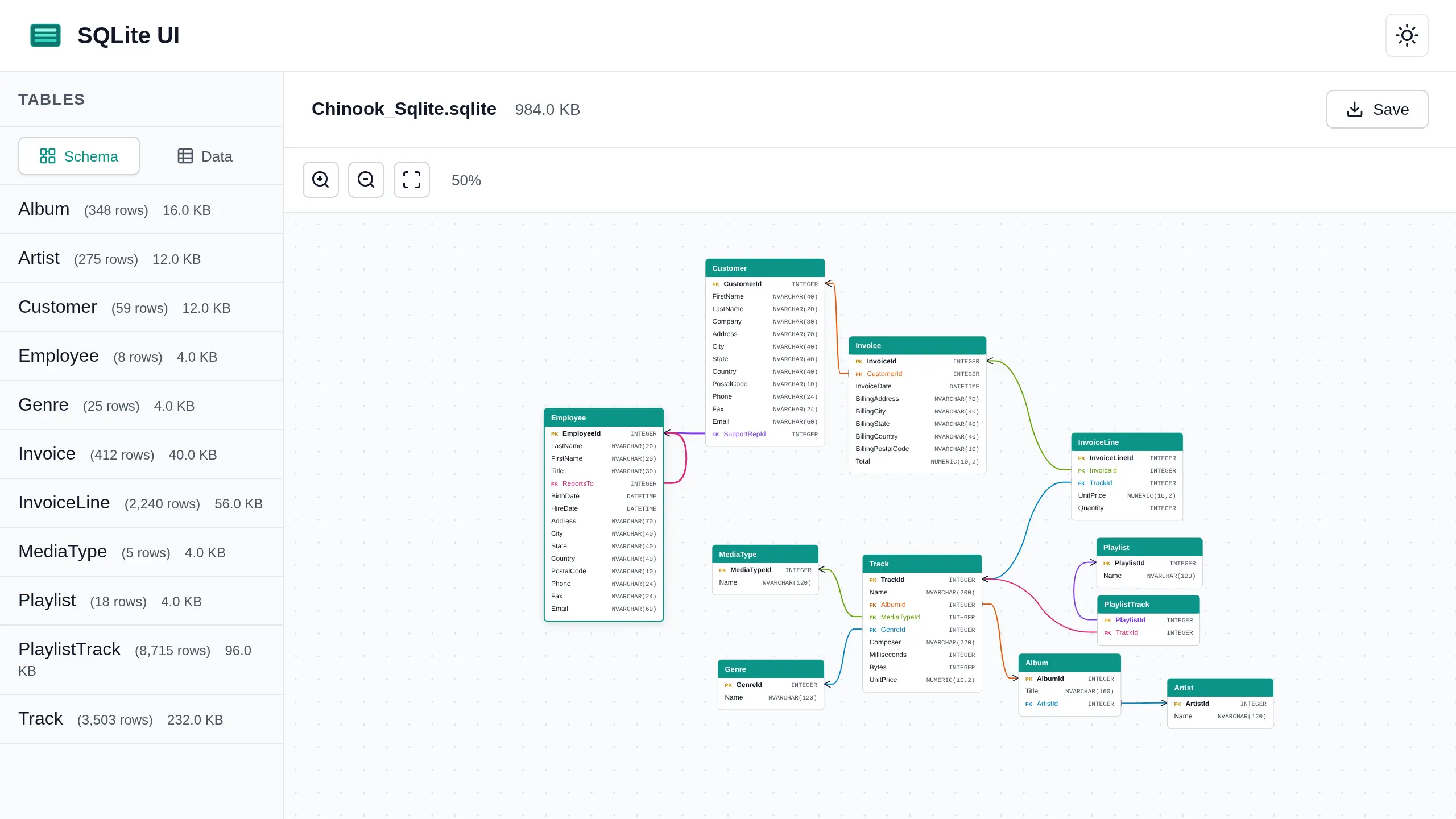
A browser-based web app for interacting with a SQLite database felt like a good fit. Even better, if it worked well, I could actually use it myself in the future.
This was my first prompt, using plan mode:
create a product requirements document for a browser based sqlite DB viewer, it should allow opening a sqlitedb file, show the contents and be interactive. No frontend JavaScript framework just keep it simple, lightweight and static.
This resulted in a fairly large list of requirements, which were stored in PRD.md.
I then converted those requirements into PRD.json, following the approach Matt used in his video:
use @PRD.md to create PRD.json
the file should contain an array of feature objects, the schema of an object is as follows. Break the PRD into many small features.
field description category functional, non functional, etc description a brief 1 sentence description of the feature steps array of strings, eg. when button is clicked, colour changes passes boolean representing if the feature is complete and working as intended
In total, this resulted in 62 requirements.
If you’re interested, you can view them below:
Click to expand
[
  {
    "category": "functional",
    "description": "User can drag and drop a SQLite file onto the page to open it",
    "steps": [
      "User drags a .db, .sqlite, .sqlite3, or .db3 file over the drop zone",
      "Drop zone visual indicator activates (highlight/border change)",
      "User drops the file",
      "File is read using the File API",
      "Database is loaded into sql.js",
      "UI transitions from empty state to database view"
    ],
    "passes": false
  },
  {
    "category": "functional",
    "description": "User can click a browse button to select a SQLite file",
    "steps": [
      "User clicks the 'Browse Files' button",
      "Native file picker dialog opens",
      "User selects a SQLite file",
      "File is read and loaded into sql.js",
      "UI transitions to database view"
    ],
    "passes": false
  },
  {
    "category": "functional",
    "description": "File name and size are displayed after loading a database",
    "steps": [
      "User loads a SQLite file",
      "File name appears in the header or info area",
      "File size is displayed in human-readable format (KB/MB)"
    ],
    "passes": false
  },
  {
    "category": "functional",
    "description": "All tables in the database are listed in a sidebar",
    "steps": [
      "Database is loaded",
      "Query sqlite_master for all tables",
      "Table names are rendered in a sidebar list",
      "List is scrollable if many tables exist"
    ],
    "passes": false
  },
  {
    "category": "functional",
    "description": "Each table in the sidebar shows its row count",
    "steps": [
      "Tables are listed in sidebar",
      "For each table, execute COUNT(*) query",
      "Row count is displayed next to table name"
    ],
    "passes": false
  },
  {
    "category": "functional",
    "description": "Clicking a table name loads and displays its contents",
    "steps": [
      "User clicks on a table name in the sidebar",
      "Table becomes visually selected/highlighted",
      "SELECT query executes for that table",
      "Results display in the data viewer panel"
    ],
    "passes": false
  },
  {
    "category": "functional",
    "description": "Column names and types are shown in table headers",
    "steps": [
      "Table data is displayed",
      "Header row shows column names",
      "Column data types are visible (as subtitle or tooltip)"
    ],
    "passes": false
  },
  {
    "category": "functional",
    "description": "Table data is paginated with configurable page size",
    "steps": [
      "Table with more rows than page size is selected",
      "Only first page of results is shown",
      "Pagination controls appear below the table",
      "Current page number and total pages are displayed"
    ],
    "passes": false
  },
  {
    "category": "functional",
    "description": "User can change the number of rows per page",
    "steps": [
      "Page size dropdown/selector is visible",
      "User selects a different page size (25, 50, 100, or 500)",
      "Table refreshes with new number of rows",
      "Pagination updates to reflect new total pages"
    ],
    "passes": false
  },
  {
    "category": "functional",
    "description": "User can navigate between pages using pagination controls",
    "steps": [
      "User clicks 'Next' button",
      "Next page of results loads",
      "User clicks 'Previous' button",
      "Previous page loads",
      "User can click specific page number to jump to it"
    ],
    "passes": false
  },
  {
    "category": "functional",
    "description": "Clicking a column header sorts the table by that column",
    "steps": [
      "User clicks on a column header",
      "Table sorts by that column in ascending order",
      "Sort indicator (arrow) appears on the column",
      "User clicks same header again",
      "Sort order toggles to descending",
      "Sort indicator updates to show descending"
    ],
    "passes": false
  },
  {
    "category": "functional",
    "description": "NULL values are displayed with distinct styling",
    "steps": [
      "Table contains NULL values",
      "NULL cells display 'NULL' text or placeholder",
      "NULL cells have distinct visual styling (italic, gray, etc.)"
    ],
    "passes": false
  },
  {
    "category": "functional",
    "description": "BLOB data shows a size indicator instead of raw content",
    "steps": [
      "Table contains BLOB columns",
      "BLOB cells display type indicator (e.g., 'BLOB')",
      "BLOB size is shown (e.g., '1.2 KB')",
      "Raw binary data is not rendered as text"
    ],
    "passes": false
  },
  {
    "category": "functional",
    "description": "SQL query editor text area is available for custom queries",
    "steps": [
      "Query editor panel is visible in the UI",
      "Text area accepts user input",
      "User can type SQL queries",
      "Text area supports multi-line input"
    ],
    "passes": false
  },
  {
    "category": "functional",
    "description": "User can execute a query by clicking the Run button",
    "steps": [
      "User types a SQL query in the editor",
      "User clicks the 'Run' button",
      "Query is executed against the database",
      "Results appear in the data viewer"
    ],
    "passes": false
  },
  {
    "category": "functional",
    "description": "User can execute a query with Ctrl+Enter keyboard shortcut",
    "steps": [
      "User types a SQL query in the editor",
      "User presses Ctrl+Enter (or Cmd+Enter on Mac)",
      "Query executes",
      "Results display in the data viewer"
    ],
    "passes": false
  },
  {
    "category": "functional",
    "description": "Query results display in the same table format as table browsing",
    "steps": [
      "User executes a custom SQL query",
      "Results render in the data table component",
      "Column headers show result column names",
      "Pagination works for query results"
    ],
    "passes": false
  },
  {
    "category": "functional",
    "description": "Invalid SQL queries show an error message",
    "steps": [
      "User types an invalid SQL query",
      "User executes the query",
      "Error message is displayed",
      "Error message includes the SQL error description",
      "Previous results remain visible or cleared gracefully"
    ],
    "passes": false
  },
  {
    "category": "functional",
    "description": "SQL editor has basic syntax highlighting",
    "steps": [
      "User types SQL in the editor",
      "SQL keywords (SELECT, FROM, WHERE, etc.) are highlighted",
      "String literals are highlighted in a different color",
      "Numbers are highlighted distinctly"
    ],
    "passes": false
  },
  {
    "category": "ui",
    "description": "Wide tables scroll horizontally",
    "steps": [
      "Table with many columns is displayed",
      "Table container shows horizontal scrollbar",
      "User can scroll left/right to see all columns"
    ],
    "passes": false
  },
  {
    "category": "ui",
    "description": "Table header row remains sticky when scrolling vertically",
    "steps": [
      "Table with many rows is displayed",
      "User scrolls down in the table",
      "Header row stays fixed at the top",
      "Column names remain visible while scrolling"
    ],
    "passes": false
  },
  {
    "category": "ui",
    "description": "Long cell values are truncated with ellipsis",
    "steps": [
      "Cell contains text longer than column width",
      "Text is truncated with ellipsis (...)",
      "Column maintains consistent width"
    ],
    "passes": false
  },
  {
    "category": "ui",
    "description": "Hovering over truncated cells shows full content in tooltip",
    "steps": [
      "Cell has truncated content",
      "User hovers over the cell",
      "Tooltip appears with full cell value",
      "Tooltip disappears when mouse leaves"
    ],
    "passes": false
  },
  {
    "category": "ui",
    "description": "Empty state is shown when no database is loaded",
    "steps": [
      "Application loads without a file",
      "Drop zone with instructions is displayed",
      "SQLite icon or graphic is shown",
      "Supported file formats are listed",
      "Privacy message about local data is shown"
    ],
    "passes": false
  },
  {
    "category": "ui",
    "description": "Application header displays logo and title",
    "steps": [
      "Page loads",
      "Header is visible at top of page",
      "Logo/icon is displayed",
      "'SQLite UI' title is shown"
    ],
    "passes": false
  },
  {
    "category": "functional",
    "description": "Quick filter input filters visible table rows",
    "steps": [
      "Table data is displayed",
      "Filter input field is visible above the table",
      "User types in the filter input",
      "Rows not matching the filter text are hidden",
      "Matching rows remain visible",
      "Clearing filter shows all rows again"
    ],
    "passes": false
  },
  {
    "category": "functional",
    "description": "User can export current view to CSV",
    "steps": [
      "Table data is displayed",
      "User clicks 'Export CSV' button",
      "CSV file is generated with current view data",
      "Browser downloads the CSV file"
    ],
    "passes": false
  },
  {
    "category": "functional",
    "description": "User can export current view to JSON",
    "steps": [
      "Table data is displayed",
      "User clicks 'Export JSON' button",
      "JSON file is generated with current view data",
      "Browser downloads the JSON file"
    ],
    "passes": false
  },
  {
    "category": "functional",
    "description": "User can copy cell value to clipboard",
    "steps": [
      "User clicks on a cell or uses context menu",
      "Copy option is available",
      "Cell value is copied to clipboard",
      "Visual feedback confirms copy action"
    ],
    "passes": false
  },
  {
    "category": "functional",
    "description": "Query history stores executed queries in localStorage",
    "steps": [
      "User executes a SQL query",
      "Query is saved to localStorage",
      "Query history persists after page reload",
      "Last N queries are retained (older ones removed)"
    ],
    "passes": false
  },
  {
    "category": "functional",
    "description": "User can re-run queries from history dropdown",
    "steps": [
      "User opens query history dropdown",
      "Previous queries are listed",
      "User clicks on a historical query",
      "Query populates in the editor",
      "Query can be executed"
    ],
    "passes": false
  },
  {
    "category": "functional",
    "description": "User can clear query history",
    "steps": [
      "Query history contains entries",
      "User clicks 'Clear History' option",
      "Confirmation prompt appears (optional)",
      "History is cleared from localStorage",
      "History dropdown shows empty state"
    ],
    "passes": false
  },
  {
    "category": "functional",
    "description": "Foreign key columns show a visual indicator",
    "steps": [
      "Table with foreign key constraints is selected",
      "Columns with FK constraints have an icon or badge",
      "FK indicator distinguishes FK columns from regular columns"
    ],
    "passes": false
  },
  {
    "category": "functional",
    "description": "Clicking a foreign key value navigates to the referenced row",
    "steps": [
      "Cell in a FK column is clicked",
      "Referenced table is loaded",
      "View jumps to the referenced row",
      "Referenced row is highlighted"
    ],
    "passes": false
  },
  {
    "category": "functional",
    "description": "Dark mode can be toggled via UI control",
    "steps": [
      "Theme toggle button is visible in header",
      "User clicks the toggle",
      "UI switches between light and dark themes",
      "All components update to new theme colors"
    ],
    "passes": false
  },
  {
    "category": "functional",
    "description": "Dark mode respects system preference by default",
    "steps": [
      "User has system dark mode enabled",
      "Application loads",
      "Dark theme is applied automatically",
      "User with light system preference sees light theme"
    ],
    "passes": false
  },
  {
    "category": "functional",
    "description": "Theme preference is persisted in localStorage",
    "steps": [
      "User toggles theme",
      "Preference is saved to localStorage",
      "User reloads the page",
      "Previously selected theme is applied"
    ],
    "passes": false
  },
  {
    "category": "non-functional",
    "description": "Page loads in under 500ms",
    "steps": [
      "User navigates to the application URL",
      "HTML, CSS, and critical JS load",
      "Initial UI renders within 500ms",
      "Empty state is interactive"
    ],
    "passes": false
  },
  {
    "category": "non-functional",
    "description": "sql.js WebAssembly module loads in under 1 second",
    "steps": [
      "Page load initiates WASM fetch",
      "sql-wasm.wasm file downloads",
      "WASM module compiles and initializes",
      "Total time is under 1 second on broadband"
    ],
    "passes": false
  },
  {
    "category": "non-functional",
    "description": "10MB database file opens in under 2 seconds",
    "steps": [
      "User loads a 10MB SQLite file",
      "File is read into memory",
      "sql.js initializes the database",
      "Table list is populated",
      "Total time is under 2 seconds"
    ],
    "passes": false
  },
  {
    "category": "non-functional",
    "description": "Simple SELECT queries execute in under 100ms",
    "steps": [
      "Database is loaded",
      "User runs a simple SELECT query",
      "Query executes and returns results",
      "Results render in under 100ms total"
    ],
    "passes": false
  },
  {
    "category": "non-functional",
    "description": "Warning is shown for files over 100MB",
    "steps": [
      "User attempts to load a file larger than 100MB",
      "Warning message is displayed",
      "User can choose to proceed or cancel",
      "File loads if user confirms"
    ],
    "passes": false
  },
  {
    "category": "non-functional",
    "description": "Files over 500MB are rejected with an error",
    "steps": [
      "User attempts to load a file larger than 500MB",
      "Error message is displayed",
      "File is not loaded",
      "Application remains functional"
    ],
    "passes": false
  },
  {
    "category": "non-functional",
    "description": "Loading progress is shown for files over 10MB",
    "steps": [
      "User loads a file larger than 10MB",
      "Progress indicator appears",
      "Progress updates as file loads",
      "Progress indicator disappears when complete"
    ],
    "passes": false
  },
  {
    "category": "non-functional",
    "description": "Application uses semantic HTML elements",
    "steps": [
      "Page uses appropriate semantic tags",
      "Tables use <table>, <thead>, <tbody>, <th>, <td>",
      "Navigation uses <nav>",
      "Main content uses <main>",
      "Buttons use <button> elements"
    ],
    "passes": false
  },
  {
    "category": "non-functional",
    "description": "Interactive elements have ARIA labels",
    "steps": [
      "Buttons have aria-label or visible text",
      "Icon-only buttons have descriptive aria-labels",
      "Form inputs have associated labels",
      "Status messages use aria-live regions"
    ],
    "passes": false
  },
  {
    "category": "non-functional",
    "description": "Application is keyboard navigable",
    "steps": [
      "User can Tab through all interactive elements",
      "Focus indicators are visible",
      "Enter/Space activates buttons",
      "Escape closes modals/dropdowns"
    ],
    "passes": false
  },
  {
    "category": "non-functional",
    "description": "Color contrast meets WCAG AA standards",
    "steps": [
      "Text has minimum 4.5:1 contrast ratio against background",
      "Large text has minimum 3:1 contrast ratio",
      "Interactive elements are distinguishable",
      "Both light and dark themes meet contrast requirements"
    ],
    "passes": false
  },
  {
    "category": "non-functional",
    "description": "No data is transmitted to external servers",
    "steps": [
      "User loads and queries a database",
      "Network tab shows no external requests with user data",
      "All processing happens client-side",
      "Only static assets are fetched from hosting server"
    ],
    "passes": false
  },
  {
    "category": "non-functional",
    "description": "User input displayed in UI is properly sanitized",
    "steps": [
      "Database contains potentially malicious content (script tags, etc.)",
      "Data is displayed in the table",
      "No scripts execute",
      "HTML entities are properly escaped"
    ],
    "passes": false
  },
  {
    "category": "non-functional",
    "description": "Application works in Chrome 80+",
    "steps": [
      "Application is opened in Chrome 80 or later",
      "All features function correctly",
      "No console errors related to unsupported APIs"
    ],
    "passes": false
  },
  {
    "category": "non-functional",
    "description": "Application works in Firefox 75+",
    "steps": [
      "Application is opened in Firefox 75 or later",
      "All features function correctly",
      "No console errors related to unsupported APIs"
    ],
    "passes": false
  },
  {
    "category": "non-functional",
    "description": "Application works in Safari 14+",
    "steps": [
      "Application is opened in Safari 14 or later",
      "All features function correctly",
      "No console errors related to unsupported APIs"
    ],
    "passes": false
  },
  {
    "category": "non-functional",
    "description": "Application works in Edge 80+",
    "steps": [
      "Application is opened in Edge 80 or later",
      "All features function correctly",
      "No console errors related to unsupported APIs"
    ],
    "passes": false
  },
  {
    "category": "ui",
    "description": "Sidebar is resizable or has appropriate fixed width",
    "steps": [
      "Sidebar displays table list",
      "Sidebar has reasonable width for table names",
      "Long table names are truncated or sidebar scrolls horizontally"
    ],
    "passes": false
  },
  {
    "category": "ui",
    "description": "Selected table is visually highlighted in sidebar",
    "steps": [
      "User clicks on a table in the sidebar",
      "Selected table has distinct background or border",
      "Selection is clearly visible",
      "Previous selection is deselected"
    ],
    "passes": false
  },
  {
    "category": "ui",
    "description": "Table name and row count displayed above data viewer",
    "steps": [
      "User selects a table",
      "Table name appears above the data grid",
      "Row count is displayed (e.g., '1,234 rows')"
    ],
    "passes": false
  },
  {
    "category": "ui",
    "description": "Query editor panel is collapsible or togglable",
    "steps": [
      "Query editor panel has expand/collapse control",
      "User clicks to collapse the panel",
      "Panel minimizes to save space",
      "User can expand it again"
    ],
    "passes": false
  },
  {
    "category": "functional",
    "description": "First column can be made sticky via toggle",
    "steps": [
      "Toggle for sticky first column is available",
      "User enables the toggle",
      "First column remains fixed when scrolling horizontally",
      "User can disable to return to normal scrolling"
    ],
    "passes": false
  },
  {
    "category": "functional",
    "description": "Column-specific filtering allows filtering by individual columns",
    "steps": [
      "User opens column filter options",
      "User can select which column to filter",
      "User enters filter value",
      "Only rows matching that column's filter are shown"
    ],
    "passes": false
  },
  {
    "category": "functional",
    "description": "User can copy entire row to clipboard",
    "steps": [
      "User selects a row or uses row context menu",
      "Copy row option is available",
      "Row data is copied as tab-separated or JSON",
      "Visual feedback confirms copy"
    ],
    "passes": false
  },
  {
    "category": "functional",
    "description": "Foreign key relationships are shown in schema info",
    "steps": [
      "User views table schema/structure",
      "FK relationships are listed",
      "Referenced table and column are displayed"
    ],
    "passes": false
  }
]
Armed with my Ralph script, I was ready to let it rip.
#!/bin/bash

set -e

if [ -z "$1" ]; then
  echo "Usage: $0 {iterations}"
  exit 1
fi


for ((i=1; i<=$1; i++)); do
  echo "Iteration: $i"
  echo "---------------------------------------"
  result=$(claude --permission-mode acceptEdits -p "@PRD.json @progress.txt \
1. Find the highest-priority feature to work on and work only on that feature. \
2. Check that the tests pass. \
3. Update the PRD (PRD.json) with the work that was done. \
4. Append your progress to the progress.txt file. \
ONLY WORK ON A SINGLE FEATURE
If, while implementing the feature, you notice the PRD is complete, output <promise>COMPLETE</promise>. \
")

  echo "$result"

  if [[ "$result" == *"<promise>COMPLETE</promise>"* ]]; then
    echo "PRD COMPLETE"
    exit 0
  fi
done
I ran the script with 10 iterations at a time. Each iteration blocks with no output, so I eagerly awaited completion every time.
There was no git history with my approach. I was living dangerously. I relied on the progress.txt file after each iteration to see what had changed and refreshing my browser to see whether anything broke. To my surprise, everything held together quite well and the app quickly started to resemble a fully-featured database UI.
I couldn’t complete all requirements in one go. As features accumulated, token usage climbed significantly, and I ended up running the experiment over roughly two days.
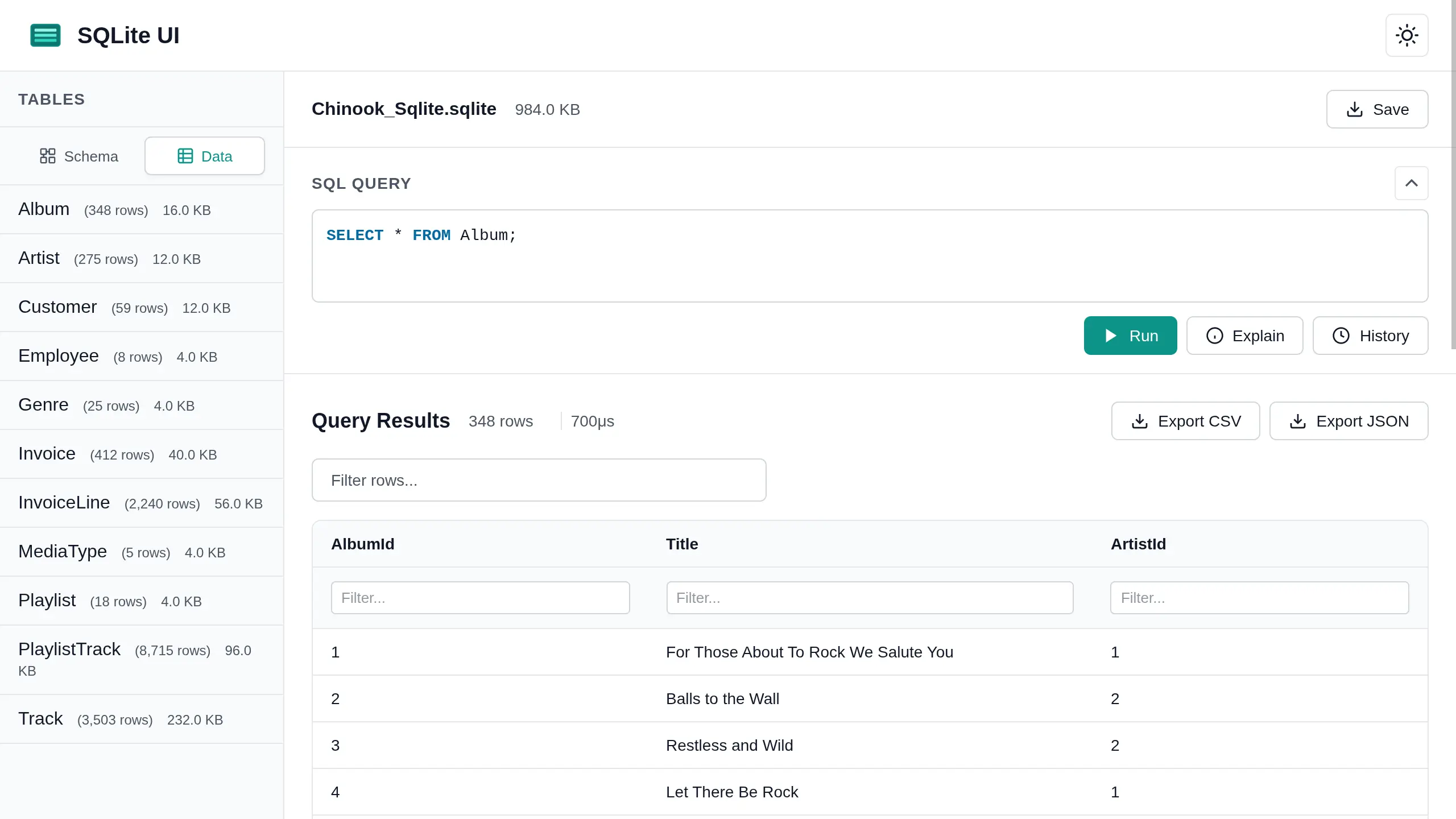
Once all the original requirements were implemented, I couldn’t help myself and started asking for more features, including:
- Showing table storage sizes
- Running
EXPLAINon queries - Displaying query execution duration
- Interactive row editing
- Saving the updated database
- Index management
- Schema diagrams
- …and more
At that point, I’d gone from engineer to an overly excited product manager who had just discovered a software engineer that works 24/7, never says no, and doesn’t have the self-respect to push back on scope creep.
The Final Result
You can try it out here lochie.dev/sqlite-ui

Reflections
With a minimal prompt, I was able to generate a full list of requirements and put Claude straight to work. The result was largely what I expected but still impressive given my limited prompt.
I asked for a simple static implementation, and that’s exactly what I got single HTML, CSS and JavaScript files. The only external dependency was sql-wasm. Claude built a solid foundation that could be extended further.
Displaying table storage sizes initially didn’t work. Claude noted that this might not work during
implementation due to the compilation flags used by sql-wasm.
I rebuilt it myself with SQLITE_ENABLE_DBSTAT_VTAB, updated the HTML to point at my build, served the files with HTTP server
(required for WASM loading), and everything worked without any further code changes.
A few shortcomings became obvious:
- Claude runs with no visible intermediate output, so it’s hard to tell if it’s stuck or just slow.
- No tests were written. (It wasn’t prompted and Claude thought it was not necessary).
- The project wasn’t under version control.
- I got lucky that nothing catastrophically broke.
Still, the success isn’t surprising. Ralph essentially turns Claude into a focused software engineer working through a sprint defined by a project manager. There’s no context switching, just one story at a time.
That said, this approach is not fast, and it consumes a significant number of tokens. It’s a clear trade-off between speed and accuracy. If you have the time and can justify the cost, building a project autonomously like this makes sense especially if it’s grinding away while you’re asleep.
Future Improvements
From prior experience, Claude performs significantly better with stronger guardrails and clearer direction. While the Ralph loop works surprisingly well with minimal setup, this experiment highlighted several areas where a more deliberate structure would pay off.
Guardrails and Project Structure
Things I would do differently next time:
- Create a well-defined
CLAUDE.mdthat documents project conventions, architecture, constraints, and expectations. - Use a structured, multi-file project layout instead of a single, ever-growing JavaScript file.
- Add git from the very beginning to persist progress, enable inspection via commit history, and allow rollbacks when Claude goes down an unrecoverable path.
- Add tests — lots of them. For a web app, Playwright would be a strong choice to catch both functional and visual regressions automatically.
Because each Ralph iteration runs in a fresh Claude Code session, a substantial amount of time and tokens are spent reloading and re-understanding project context. Better structure, clearer conventions, and automated tests would significantly reduce this overhead and improve iteration quality.
Smaller Sprints and Planning Ahead
The size of the sprint also matters. 62 features in a single sprint is simply too much, that’s a lot of reasoning Claude has to do just to decide what to work on next.
One option is to manually scope stories, define relationships, and assign priorities upfront. However, a more interesting workflow would be to let Claude handle that planning step itself:
- Start with the full set of requirements.
- Ask Claude to break them into multiple smaller sprints and plan a few sprints ahead, much like a real-world agile process.
- Execute each sprint independently.
With this approach, the Ralph script could be extended to use a nested loop: iterate over sprints, then iterate over stories within each sprint. This would reduce wasted context from repeatedly scanning the full requirement set and allow Claude to run autonomously for much longer periods.
Taken further, this model could even scale to multiple “software engineers” (multiple Claude instances) working in parallel, coordinated by a higher-level orchestration layer.
Conclusion
I consider this experiment a success.
I built something genuinely useful that won’t be thrown away, learned a lot about the Ralph technique in practice, and now feel confident applying it to future projects.
I’m looking forward to trying it again with better guardrails, tests, and version control.